 +1 (774)478-6704
 Order@premiumonebackdrops.com


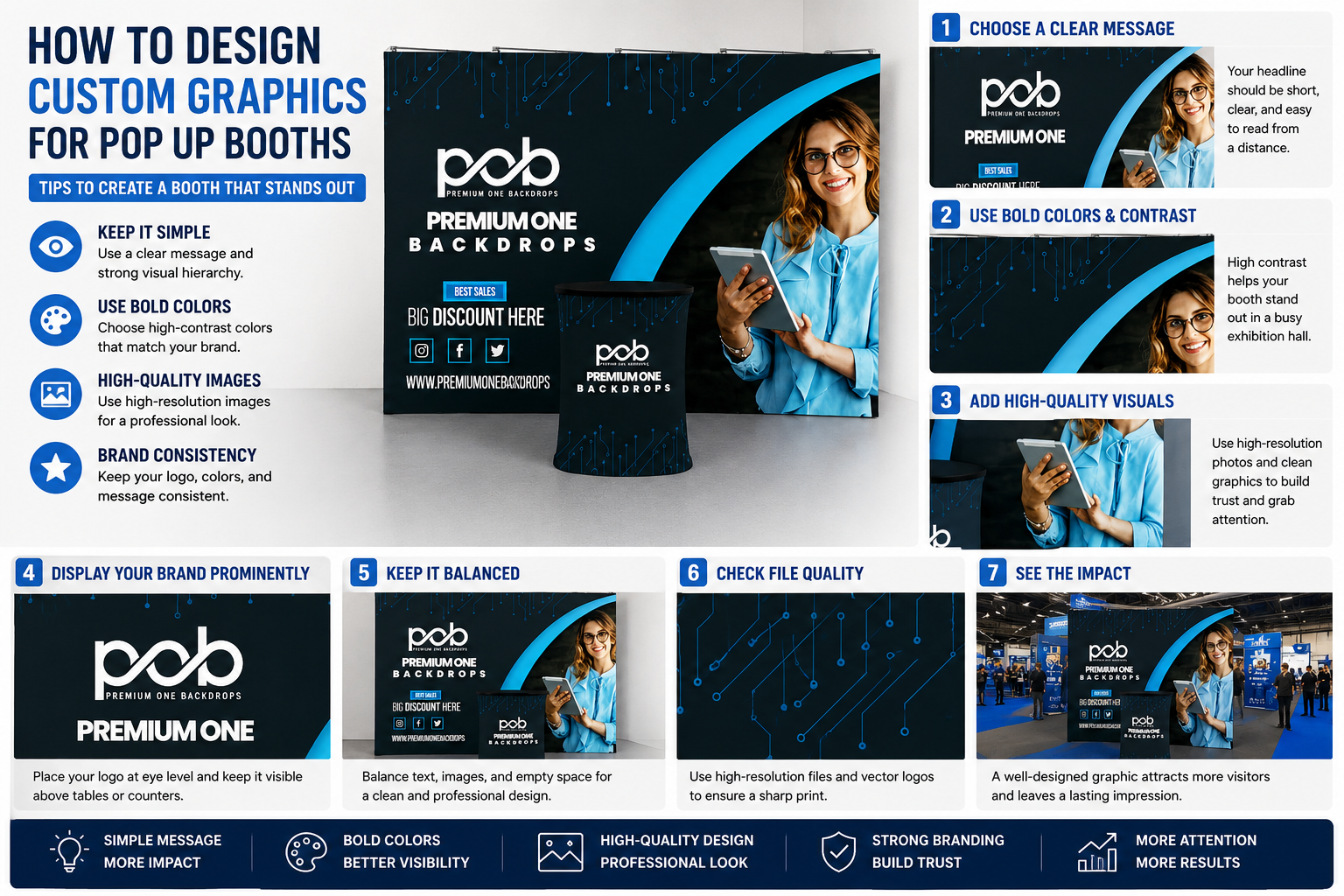
A well-designed trade show booth can attract attention before your team even starts a conversation. For exhibitors using a Pop Up Display, custom graphics play a major role in how visitors understand your brand, remember your message, and decide whether to stop at your booth.
This guide explains how to design effective custom pop up booth graphics, including layout, logo placement, color choices, image quality, and print-ready artwork preparation. Whether you are creating your first booth or updating an existing display, these pop up display design tips can help you create a cleaner and more professional presentation.
If you are preparing artwork for your next event, you can also explore our Custom Pop Up Display options or use our design support to help prepare your files for production.
Why Graphic Design Matters at Trade Shows
Trade show visitors often make quick decisions as they walk through busy aisles. Your booth graphics need to communicate who you are, what you offer, and why visitors should care within just a few seconds.
Strong trade show graphic design helps your booth:
- Attract attention from the aisle
- Communicate your message quickly
- Make your brand look more professional
- Support better photo and video content
- Create a stronger first impression
Design resources from Adobe and Canva often emphasize the importance of clarity, contrast, and visual hierarchy in professional design. These same principles are especially important for large-format booth graphics.
3 Golden Rules for Pop Up Booth Graphics
Rule 1: Keep It Simple
The most effective booth graphics are usually simple. A Pop Up Display should not look like a brochure enlarged onto a wall. Too much text can overwhelm visitors and make your message harder to read.
For best results, focus on:
- One main headline
- One clear value statement
- Three short supporting points at most
- Large, readable text
- Clean spacing around important elements
A good rule is to design for aisle visibility first. If someone cannot understand your message from a few steps away, the design is too complicated.
Rule 2: Use High-Resolution Images
Large-format printing requires high-quality artwork. Low-resolution images may look acceptable on a computer screen but appear blurry or pixelated when printed at full booth size.
When preparing custom pop up booth graphics, use:
- Vector logos whenever possible
- High-resolution images, ideally 150 dpi or higher at final print size
- CMYK color mode when required for print production
- Outlined fonts or embedded fonts
- Print-ready PDF, AI, EPS, or other approved file formats
If you are unsure whether your artwork is suitable, our team can help review your file before production. You can also use product templates to reduce sizing mistakes and avoid unnecessary back-and-forth revisions.
Rule 3: Place Your Logo Where People Actually Look
Logo placement is one of the most important parts of booth graphic design. Many exhibitors place their logo too low, where it may be blocked by tables, counters, visitors, or booth accessories.
For a Pop Up Display, your logo should usually appear near the upper or center visual area, where it is easy to see from the aisle and in event photos.
Avoid placing key brand elements:
- Too close to the bottom edge
- Behind tables or counters
- In areas likely to be blocked by people
- Too close to seams, edges, or hardware areas
Choosing the Right Colors for Your Brand
Color affects how visitors perceive your booth. A strong color palette can make your booth more memorable, while weak contrast can make important text difficult to read.
When choosing colors for pop up display graphics, consider the lighting conditions at trade shows. Exhibition halls are often bright, busy, and visually crowded. Your design should remain readable under different lighting conditions.
Practical color tips include:
- Use strong contrast between text and background
- Avoid light gray text on white backgrounds
- Avoid yellow text on white backgrounds
- Use brand colors consistently
- Keep background patterns subtle if text is placed on top
Design platforms such as Creative Bloq and Smashing Magazine frequently highlight the importance of contrast, readability, and user-focused visual design. These principles also apply to trade show graphics.
Common Pop Up Booth Graphic Design Mistakes
Many booth designs look good on screen but do not work well in a real exhibition environment. Avoiding common mistakes can make your final display look more professional.
Using Too Much Text
Your booth graphics should not explain everything. They should create interest and help start conversations.
Using Low-Resolution Images
Small web images are not suitable for large-format printing. Always use high-resolution images or vector artwork.
Placing the Logo Too Low
Lower areas are often blocked by tables, people, or booth accessories. Keep important branding in the main viewing area.
Making the QR Code Too Small
If you use a QR code, make it large enough to scan easily from a comfortable distance.
Ignoring the Template
Every booth product has a specific print area. Using the correct template helps ensure that graphics fit properly.
How to Get Your Design Ready for Production
Before submitting your artwork, make sure your file is production-ready. This helps reduce delays and improves the final print result.
Use this checklist before sending your file:
- Download and use the correct product template
- Confirm the final size matches your selected display
- Use high-resolution images
- Keep logos and important text inside the safe area
- Outline or embed fonts
- Check spelling, contact information, and QR codes
- Save the file in the approved format
Struggling with your design? Download our free templates here or contact our design team for a free consultation.
Build a Complete Booth, Not Just a Graphic
Your graphic is important, but it works best when it is part of a complete booth solution. A professional booth often combines a strong backdrop with supporting products that make the space more organized and functional.
A complete setup may include:
- Custom Pop Up Display as the main branded wall
- Custom Table Cover for a clean reception area
- Portable counter for visitor conversations
- 10x10 Trade Show Booth Kit for a fuller event setup
This approach helps your brand create a more consistent presentation across trade shows, conferences, product launches, recruiting events, and promotional campaigns.
Explore Custom Pop Up Display Solutions
If you are preparing for an upcoming event, our Custom Pop Up Display collection offers portable booth solutions designed for professional branding, easy setup, and repeated use.
Whether you already have print-ready artwork or need help preparing your files, our team can support your project from design review to production.
Need help with your booth graphics? Contact our design team or download a free template to get started.
FAQ: Common Questions About Custom Graphics
What file format is best for custom pop up booth graphics?
Print-ready PDF, AI, EPS, or high-resolution design files are commonly preferred. Vector logos are strongly recommended because they remain sharp at large sizes.
What resolution should I use for pop up display graphics?
For large-format printing, high-resolution artwork is important. Many print projects use 150 dpi or higher at final print size, depending on the artwork and product requirements.
Can I design my booth graphic in Canva?
Yes, Canva can be used for simple layouts, but make sure the final file size, resolution, and export format meet production requirements.
Where should I place my logo on a Pop Up Display?
Your logo should usually be placed in the upper or center viewing area so it remains visible from the aisle and is not blocked by tables, counters, or people.
Can I change the graphics later?
Yes. Many Pop Up Display systems allow you to keep the frame and replace the graphics when your branding, campaign, or event message changes.
Do you provide design templates?
Yes. Product templates help you prepare artwork correctly and reduce sizing issues before production.
Final Thoughts
Designing effective custom pop up booth graphics does not have to be difficult. By keeping your message simple, using high-resolution artwork, placing your logo correctly, and following the right production template, you can create a booth that looks professional and attracts attention.
A strong graphic design helps your booth stand out, supports better brand recognition, and makes your event presence more memorable.
Ready to start your design? Explore Custom Pop Up Displays, download a free template, or contact our design team for support.